

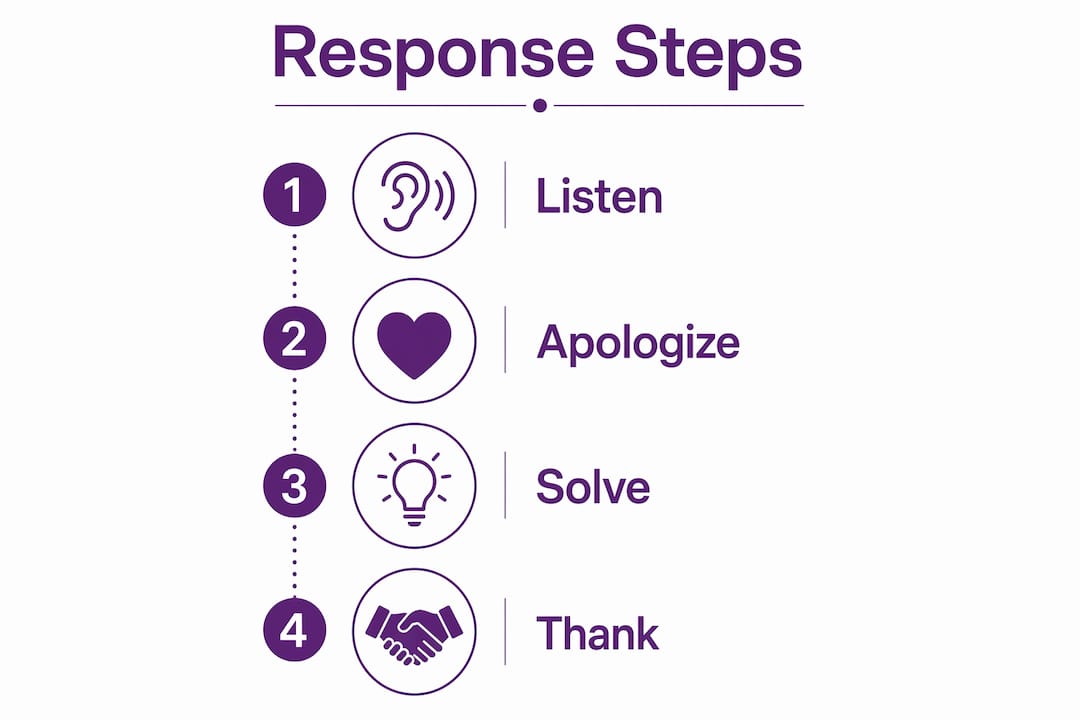
A negative review damage control strategy is the practice of quickly and professionally addressing unfavorable customer feedback online to minimize reputational harm and convert criticism into opportunity. Businesses that respond to negative reviews see average rating improvements of 0.12 stars and 12% more positive reviews. That lift matters because a single one-star drop can reduce visitor conversion by 5–15%. The industry standard for structuring these responses is the L.A.S.T. framework (Listen, Apologize, Solve, Thank), and this guide gives you every step to apply it effectively.
What is a negative review damage control strategy?
Online reputation management (ORM) is the recognized industry term for the broader discipline. A negative review damage control strategy is the tactical layer within ORM that focuses specifically on responding to, mitigating, and learning from bad reviews. The two terms work together. ORM covers monitoring, building positive signals, and managing search results. Damage control covers the immediate response when criticism goes public.
The distinction matters because many business owners treat every bad review as a one-off crisis. The more effective approach treats each negative review as a data point inside a repeatable system. That system includes monitoring tools, response templates, escalation rules, and a feedback loop into your operations.

What do you need before you can respond effectively?
Preparation separates businesses that recover quickly from those that spiral. Before a bad review lands, you need four things in place.
- Real-time monitoring alerts. Set up Google Business Profile notifications and email alerts so you know within minutes when a new review appears. Knowing how fast to respond is only useful if you actually see the review in time.
- Response templates guided by L.A.S.T. Templates speed up your process, but every reply must be customized. A generic copy-paste response signals indifference and often makes things worse.
- A designated response owner.Assign one person per location or brand as the public response owner. Accountability prevents the “someone else will handle it” trap.
- An offline escalation channel. Have a direct email address or phone number ready to move sensitive complaints off public platforms. This is not optional for complaints involving injury, property damage, or data loss.
- A complaint log. Document every negative review, the response given, and the outcome. This log feeds directly into your quality assurance process and reveals patterns you would otherwise miss.
⚡ Pro Tip
Set up a shared inbox or Slack channel dedicated to review alerts. When the whole team sees incoming reviews, response times drop and no complaint falls through the cracks.
| Preparation step | Risk it addresses |
|---|---|
| Real-time monitoring alerts | Delayed response worsening reputational damage |
| Customized L.A.S.T. templates | Generic replies that signal indifference |
| Designated response owner | Accountability gaps and inconsistent tone |
| Offline escalation channel | Legal exposure from public admissions |
| Complaint documentation log | Systemic issues going undetected and unresolved |
How do you respond to a negative review step by step?
Speed is the first variable you control. Timely responses within 24–48 hours drastically reduce reputational damage. For reviews involving safety concerns or viral potential, respond within a few hours.
A fast, calm reply is step one; our AI review response service drafts one for you to approve.
Here is the step-by-step process:
- Read the review carefully. Identify the specific complaint. Do not assume you know what went wrong before you read every word.
- Acknowledge the specific issue.Name the problem in your reply. “We're sorry your delivery arrived two days late” lands far better than “We're sorry you had a bad experience.”
- Apologize without passive aggression.Avoid phrases like “I'm sorry you feel this way.” Instead, apologize for what happened to acknowledge frustration without admitting legal liability.
- Offer a solution or next step.Tell the customer what you will do, or invite them to contact you directly to resolve it. Be specific. “Please email us at support@yourbrand.com and we will make this right” is concrete.
- Move sensitive cases offline immediately. Legal and PR experts recommend keeping all discussion of fault, root causes, or compensation off public channels when injury or data loss is involved.
- Thank the reviewer. Close by thanking them for the feedback. This signals maturity and confidence to every prospective customer reading the thread.
- Sign with your name and role.Signing with a name and role such as “Marie, Founder of [Brand]” increases perceived accountability and removes the cold corporate feel.
Keep your public reply between 50 and 100 words. Longer responses look defensive. Shorter ones look dismissive. That word count is the sweet spot for conveying empathy and resolution without oversharing.
For reply wording, see how to handle negative Google reviews.
“Your public response is not written for the person who left the review. It is written for every prospective customer who reads it next.”
⚡ Pro Tip
Read your draft reply out loud before posting. If it sounds defensive or robotic when spoken, rewrite it. Tone is harder to judge on screen than it is when heard.
What mistakes make negative review damage control worse?
The most common mistakes do not just fail to help. They actively deepen the damage.
- Arguing publicly. Disputing facts in a public reply signals defensiveness to every reader. Even if the reviewer is factually wrong, a public argument makes your business look worse.
- Accusing the reviewer of dishonesty.Calling a review fake in your public reply is a legal and PR risk. If you believe a review is fraudulent, use platform reporting tools. Epicware's bad review removal service handles this through proper channels.
- Offering incentives for review changes. Requesting or incentivizing review removals or updates violates platform terms and can trigger public backlash. Never tie a refund or discount to a review change.
- Using unedited templates. A reply that clearly ignores the specifics of the complaint tells the reader you did not actually read it. Always personalize.
- Over-apologizing. Over-apologizing appears performative and reduces credibility. One sincere, specific acknowledgment outperforms three paragraphs of regret.
“The goal is not to win the argument. The goal is to demonstrate to the next customer that your business handles problems with professionalism.”
⚡ Pro Tip
Before you post any reply, ask yourself: “Would I be comfortable if this response appeared in a news article about my business?” If the answer is no, rewrite it.
Repeated negative feedback with a common theme signals a product defect or service gap. These require formal corrective action, not just better replies. When the same complaint appears five times, the problem is operational, not communicational.
How do you measure whether your damage control is working?
Measuring the impact of your response strategy turns a reactive process into a growth tool. Track these metrics consistently.
- Average star rating trend. Monitor your rating weekly. A rising trend after you implement structured responses confirms the approach is working.
- Volume of new positive reviews. Businesses that respond to negative reviews see 12% more positive reviews over time. That increase reflects improved customer confidence in your responsiveness.
- Response time average. Track how long it takes your team to post a reply. Aim for under 24 hours across all reviews.
- Complaint recurrence rate. If the same issue appears repeatedly, your operational fix has not taken hold. This metric connects your response strategy to your quality assurance process.
⚡ Pro Tip
Use a simple spreadsheet to log every negative review, your response time, and whether the reviewer updated their rating. After 90 days, you will have clear data on what is working.
| Metric | What it tells you |
|---|---|
| Average star rating trend | Whether responses are rebuilding overall reputation |
| New positive review volume | Whether customers trust your responsiveness |
| Response time average | Whether your monitoring and workflow are fast enough |
| Complaint recurrence rate | Whether operational fixes are actually being implemented |
Once you have mitigated a negative review effectively, use your public response as social proof. Prospective customers who see a thoughtful, professional reply to a complaint often trust your business more than if no complaint had appeared at all. A well-handled criticism, visible on your Google Business Profile, can convert skeptical visitors into paying customers.
You can also follow up privately with resolved customers and invite them to update their review. Do not offer any incentive. Simply let them know the issue has been fixed and that updated feedback helps other customers make informed decisions.
Key Takeaways
A structured negative review damage control strategy, built on the L.A.S.T. framework, measurably improves star ratings, increases positive review volume, and protects revenue from the conversion losses caused by one-star drops.
| Point | Details |
|---|---|
| Respond within 24–48 hours | Faster responses reduce reputational damage before more customers see the review. |
| Use the L.A.S.T. framework | Listen, Apologize, Solve, and Thank structures every reply for maximum trust impact. |
| Keep replies to 50–100 words | Concise responses read as confident; long replies read as defensive. |
| Move sensitive complaints offline | Injury or data loss complaints must leave public channels to limit legal exposure. |
| Feed complaints into operations | Recurring themes signal systemic issues that require fixes, not just better replies. |
Why your response matters more to the next customer than to the reviewer
Here is the insight most business owners miss. When you reply to a negative review, you are not writing to the person who left it. You are writing to the next 50 people who read that review before deciding whether to visit your business. Public replies shape perception among prospective customers far more than they change the original reviewer's mind.
I have seen business owners spend enormous energy trying to convince an unhappy customer to update their rating. That energy is almost always wasted. The reviewer has moved on emotionally. The audience reading the thread has not. A calm, specific, human reply to a one-star review can neutralize its impact entirely for every future reader.
The L.A.S.T. framework works because it forces you to slow down and address the actual complaint rather than your emotional reaction to it. The businesses I have watched recover fastest from reputation crises are not the ones with the fewest bad reviews. They are the ones whose responses make you think, “This company actually cares.”
One more thing: sign your replies with your real name and role. It sounds small, but it is the single fastest way to humanize your brand. A reply signed “The Management Team” reads as a form letter. A reply signed “James, Operations Manager” reads as a real person taking ownership.
The systematic feedback loop is what separates tactical damage control from long-term reputation growth. Every complaint is a free quality audit. The businesses that treat it that way build reputations that bad reviews cannot dent.
— Vignesh
How Epicware helps you put this into practice
Protecting your reputation requires speed, consistency, and data. Epicware's reputation management platform gives business owners real-time review alerts, structured response workflows, and analytics that track rating trends over time.
Epicware serves businesses across Singapore, the USA, the UK, Dubai, and Malaysia, with location-specific solutions built for local search dynamics in each market. For businesses dealing with fake or malicious reviews, Epicware's bad review removal service charges $200 per review, refunded in full if it isn't taken down within 3 months. Whether you manage one location or fifty, Epicware gives you the infrastructure to respond faster, track results, and grow your rating with confidence.
If the review is fake or breaks the rules, we can remove bad Google reviews like it through a formal request.
FAQ
What is the L.A.S.T. framework for negative reviews?
L.A.S.T. stands for Listen, Apologize, Solve, and Thank. It is the industry-standard structure for crafting public responses to negative reviews that reduce reputational damage and build prospective customer trust.
How fast should you respond to a negative review?
Respond within 24–48 hours for standard reviews. For critical reviews involving safety or viral potential, respond within a few hours to limit damage before more customers see the complaint.
Can you ask a customer to remove a negative review?
You can invite a customer to update their review after resolving their issue, but never tie any incentive to that request. Offering refunds or discounts in exchange for review changes violates platform terms and risks public backlash.
What should you never say in a public review response?
Avoid “I'm sorry you feel this way,” public accusations of dishonesty, and any admission of legal fault. These phrases either signal defensiveness or create legal exposure for your business.
How do you know if your damage control strategy is working?
Track your average star rating trend, new positive review volume, and complaint recurrence rate over 90 days. A rising rating and fewer repeat complaints confirm that both your responses and your operational fixes are taking effect.
See how your Google Business Profile looks to potential customers — ratings, review patterns, and what's costing you conversions — with a free audit from Epicware.
Get Your Free GBP Audit →Related Articles
Written by the Epicware Team at Epicware, an AI-powered digital marketing agency in Singapore.